FMXER 1.6: declarative FireMonkey UIs for Delphi 12 and 13
I first showed FMXER at EKON 23 and CodeRage 2019: a small framework to build FireMonkey screens the way Flutter does, composing small elements in code instead of designing every screen in the form designer. Version 1.1 came out in November 2022, with Skia4Delphi and Delphi 11 Alexandria… and then the project went quiet for a while.
This month FMXER got a lot of attention: six releases, from v.1.2 to v.1.6, bring it to Delphi 12 Athens and 13 Florence, with the Skia built into RAD Studio, a test suite, packages, a setup, a documentation site and demos ready for Android 15. Here is what changed and why it matters for your FMX apps.
A quick reminder: what FMXER is
An FMXER application is a set of named routes. A route is a screen: a form or a frame, built by a configuration procedure that composes elements (texts, buttons, edits, lists, cards, images, QR codes…) in containers (columns, rows, scroll boxes, a scaffold with title bar and action button). The navigator creates, shows and frees them for you:
Navigator(FormStand1)
  .DefineRoute<TScaffoldForm>('home'
  , procedure (Home: TScaffoldForm)
    begin
      Home
      .SetTitle('Hello, FMXER!')
      .SetContentAsForm<TColumnForm>(
        procedure (Col: TColumnForm)
        begin
          Col
          .AddFrame<TTextFrame>(50
          , procedure (Text: TTextFrame)
            begin
              Text.SetContent('A screen composed in code');
            end
          )
          .AddFrame<TButtonFrame>(60
          , procedure (Button: TButtonFrame)
            begin
              Button
              .SetText('Say hello')
              .SetOnClickHandler(
                procedure
                begin
                  Home.ShowSnackBar('Hello!', 2000);
                end
              );
            end
          );
        end
      );
    end
  );

Navigator.RouteTo('home');
Everything is shown through TFrameStand, so transitions and visual effects come from a TStyleBook, not from code.
From v.1.1 to v.1.6
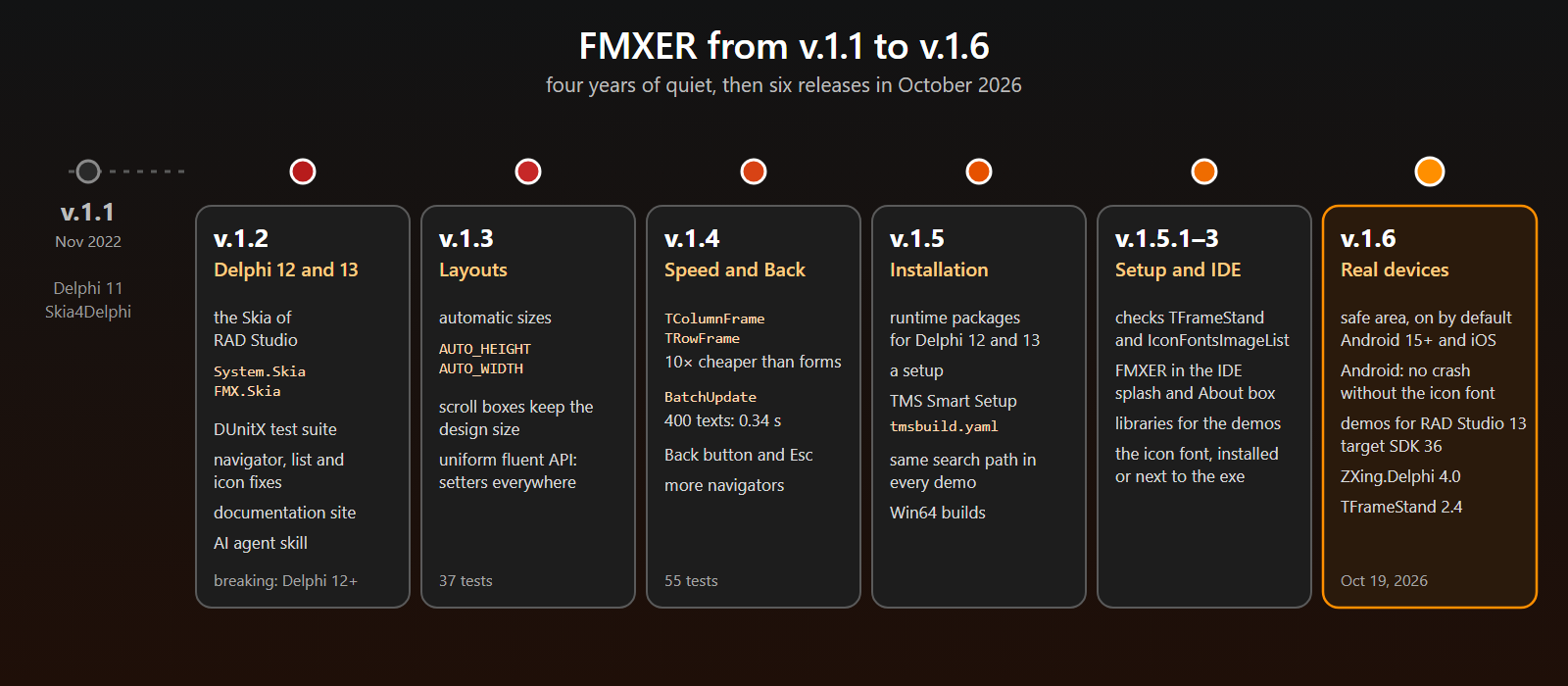
Each release has a theme. Here they are, grouped by what you get.
Delphi 12 and 13, with the Skia of RAD Studio
Since Delphi 12, Skia is part of RAD Studio, so v.1.2 drops Skia4Delphi and uses the built-in units: System.Skia, FMX.Skia and FMX.Skia.Canvas instead of Skia, Skia.FMX and Skia.FMX.Graphics. This is the one breaking change: replace those names in your uses clauses (the .fmx files do not change). On Delphi 11, keep using v.1.1.
The same release fixed a group of defects, each with a test in a new DUnitX suite: CloseRoute removes the right route from the stack, transient routes no longer make CloseAllRoutes raise, TListViewFrame no longer duplicates its items on pull-to-refresh, AddIcon reuses an icon already added. The suite has grown to 55 tests, and it passes on Win32 and Win64.
A navigator ready for real devices
Three changes make the navigator behave the way users expect on a phone.
The Back button (v.1.4). One line, and Back on Android (or Esc on desktop) closes the top route; on the root route the key goes to the form, so the app closes as usual; with a wait screen open, the key is consumed:
Navigator(FormStand1)
  .SetCatchBackKey(True);
The safe area (v.1.6). Android 15 draws every app edge-to-edge, and RAD Studio 13 targets SDK 35 and later: the form goes under the status bar and the navigation bar. On iOS the notch and the home indicator do the same. The navigator now shows the routes in a layout that gets the safe area insets as margins, on by default: your existing apps get it with no code. The area under the system bars shows the Fill of the form.
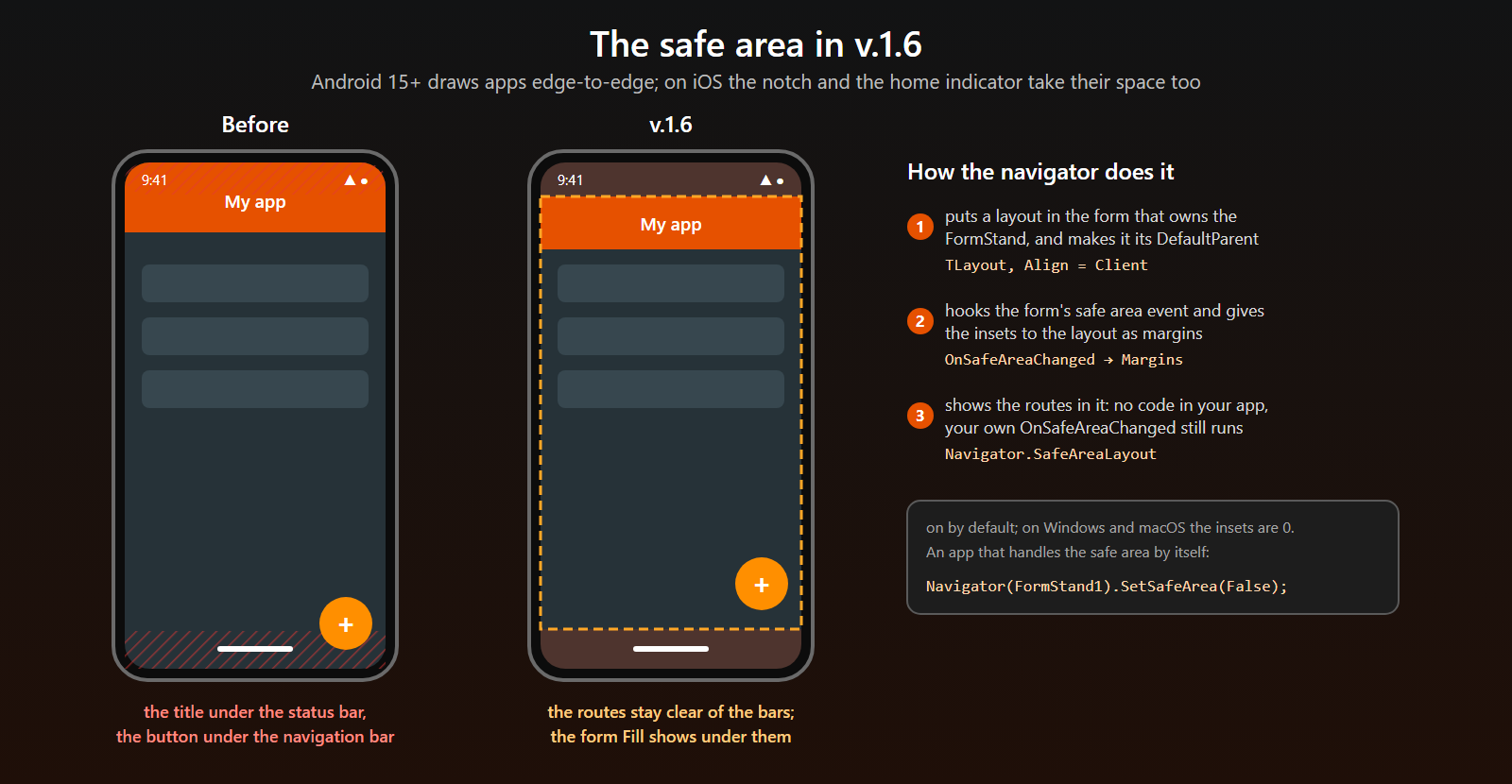
An app that handles the safe area by itself turns it off before the first route:
Navigator(FormStand1).SetSafeArea(False);More navigators (v.1.4). Navigator(AFormStand) with a second form stand now raises instead of silently returning the first navigator; when you need more than one, TNavigator.Create gives each its own routes and stack.
Layouts: automatic sizes and speed
FMXER sizes top-down: the container decides the size of each slot. v.1.3 adds the opposite option: pass AUTO_HEIGHT (or AUTO_WIDTH in a row) and the slot takes the size of the element, the one designed in its .fmx or the one set in the configuration procedure:
Col
.AddFrame<TTextFrame>(TColumnForm.AUTO_HEIGHT)           // 80: the design height of TTextFrame
.AddFrame<TEditFrame>(TColumnForm.AUTO_HEIGHT
, procedure (Edit: TEditFrame)
  begin
    Edit.SetCaption('Name').SetHeight(90);               // 90: set here
  end
);
v.1.4 looked at performance. On Windows every form creates a native window: 2.4 ms per TColumnForm against 0.2 ms for a frame. The new TColumnFrame and TRowFrame have the same API as frames, about ten times cheaper. And BatchUpdate realigns a container once, instead of at every element added: 400 texts take 0.34 seconds instead of 1.5–2.
Col.BatchUpdate(
  procedure (C: TColumnFrame)
  begin
    for var LItem in Items do
      C.AddFrame<TRowFrame>(48
      , procedure (Row: TRowFrame)
        begin
          Row
          .AddFrame<TTextFrame>(TRowFrame.AUTO_WIDTH)
          .AddFrame<TButtonFrame>(80);
        end
      );
  end
);
v.1.3 also made the fluent API uniform: every slot method returns its container, every clickable element has SetOnClickProc, and properties got their setters (TCardFrame.SetTitle, TWebViewFrame.SetURL…). These are all additions: existing code compiles unchanged.
Install it your way
Until v.1.4, using FMXER meant cloning the repository and adding folders to the search path. That still works, and now there are two more ways (see Installation):
- a setup (v.1.5), for Delphi 12 and 13: it checks that TFrameStand and IconFontsImageList are installed, builds the runtime packages, sets the library path of every platform, installs the libraries the demos need and the Material Design icon font;
- TMS Smart Setup: the
tmsbuild.yamlis in the repository, with TFrameStand as a dependency (tms install andreamagni.fmxerworks once FMXER is listed in the Smart Setup registry).
FMXER has no components to drop on a form, but a small design-time package now puts the rocket, with its version, in the splash screen and in the About box of the IDE.
The icon font deserves a word: without *Material Design Icons Desktop* installed, icons were drawn as empty boxes. The setup installs it, and FMXER.IconFontsData also registers the .ttf found next to the executable (or deployed to assets\internal on Android), so you can deploy it with your app.
Demos for RAD Studio 13
All the demos compile and run on Delphi 12 and 13, from the smallest app to copy (NewProjectTemplate) to a QR code reader with the camera. With v.1.6 they are updated for RAD Studio 13: target SDK 36, Android64 deployments with their fonts, animations and images, only the permissions each demo uses, and the FMXER rocket as an adaptive launcher icon. The QRCode demo moved to ZXing.Delphi 4.0 and reads codes with its IScanManager and ScanAsync, decoding in the background.
Documentation, tests and an AI agent skill
FMXER now has a documentation site: a guide (navigation, layouts, styling, state, custom elements), the catalog of the elements, a reference and the release notes.
And because more and more of us write Delphi code with an AI agent next to us, the repository includes an Agent Skill, fmxer-development: it teaches Claude Code (and any tool supporting SKILL.md) the FMXER API and the mistakes to avoid, like white text on a white background or the old Skia unit names. The repository is also a Claude plugin marketplace:
/plugin marketplace add andrea-magni/FMXER
/plugin install fmxer@fmxer
Getting started
- Install TFrameStand and IconFontsImageList (GetIt), then the FMXER setup.
- Open
demos\AllDemos.groupprojand run HelloWorld, or copy NewProjectTemplate to start your own app. - Follow Your First App, then browse the element catalog.
Upgrading from v.1.1? Move to Delphi 12 or 13, replace the Skia unit names, and read the release notes: most of the rest is additions.
FMXER is open source and free. Feedback, issues and ideas are welcome on GitHub. Happy coding!