ScannerMApp, nine years later: ZXing.Delphi 4, TFrameStand and Android intents
In June 2017 I wrote about ScannerMApp, a small QR code and barcode scanner built with Delphi, ZXing.Delphi and TFrameStand. It was a sample: a way to show how TFrameStand turns a few frames into the views of a mobile app. Nine years, several Delphi versions and many Android versions later, it deserved more than a recompile. So I picked it up again: ScannerMApp now builds with RAD Studio 13, runs on recent Android versions and does much more than it did. The code is on GitHub, open source as always.
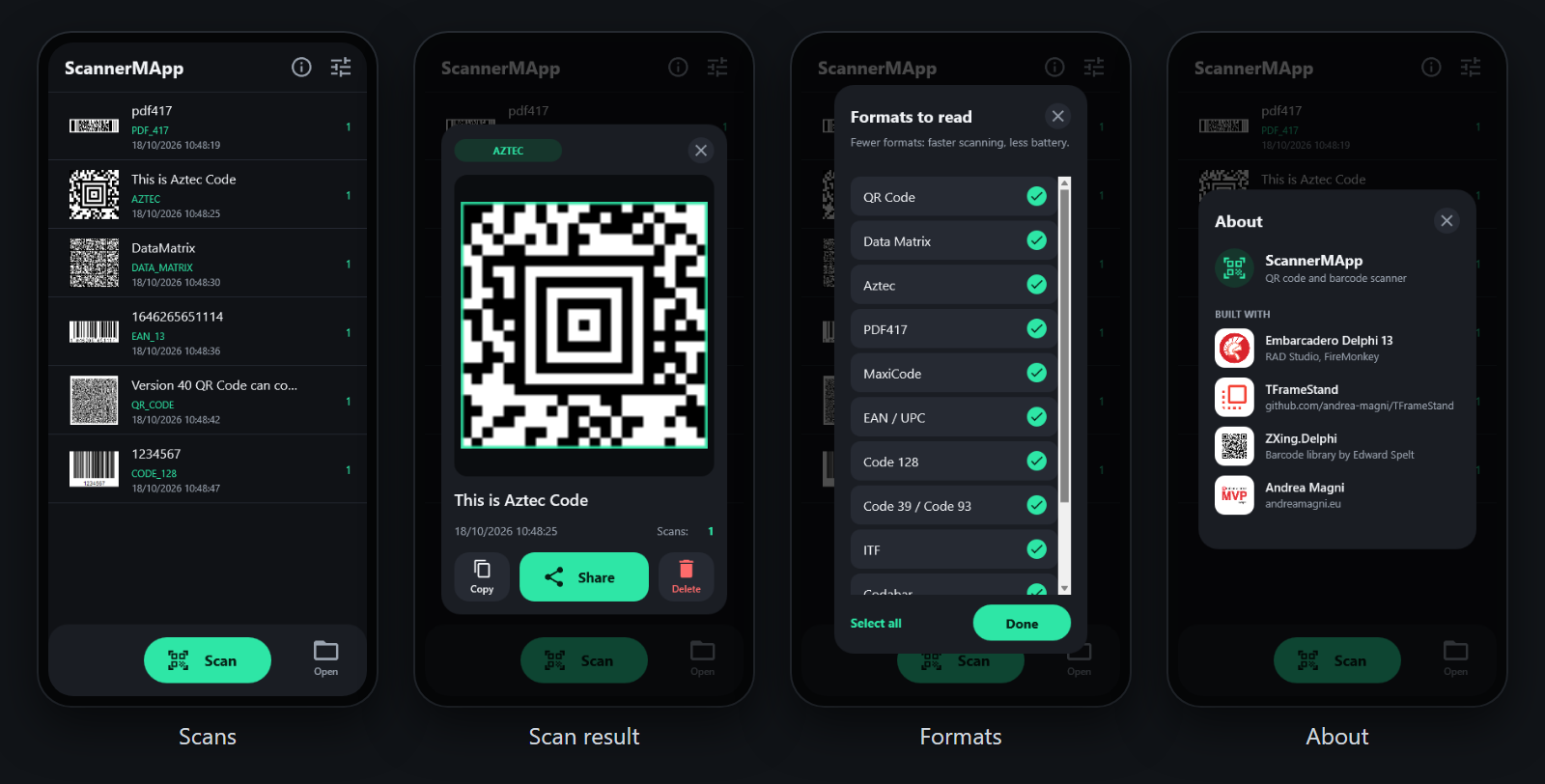
Back on today’s Android
The first step was to make it run well where most people would use it: a recent Android phone. Android changed a lot since 2017, and an app that only “starts” is not good enough. Now:
- the UI is dark, with a palette and Material icons of its own;
- the app is edge-to-edge (required since Android 15), and the content stays clear of the status bar and the navigation bar;
- it asks for one permission only, the camera, and only the first time you tap Scan: reading a picture from the photo library needs no storage permission;
- the Back key closes what is open (the result card, the settings) and then leaves the app, as Android users expect;
- the launcher icon is adaptive, also in its themed (monochrome) version.
ZXing.Delphi 4: decoding in the background
The heart of a scanner is the decoder. ScannerMApp moved to ZXing.Delphi 4, now a git submodule of the repository, and this changed the feel of the app more than anything else. With version 4 a scan manager can decode a frame in a background thread with ScanAsync: the camera preview stays smooth, and the result comes back in the main thread.
FCameraScanManager.ScanAsync(AFrame,
  procedure(AResult: TReadResult)
  begin
    // main thread; nil when nothing was read
    if not Assigned(AResult) then
      Exit;
    if AResult.Error <> '' then
    begin
      // a code found but not read: ask to hold still
      TMessageManager.DefaultManager.SendMessage(Self,
        TScanHintMessage.Create('Code found: hold the phone still, or move closer'));
      AResult.Free;
      Exit;
    end;
    DeliverResult(FScanFrame, AResult, True);
  end);
That Error is a small thing users notice: when ZXing finds a code but cannot read it yet, the app says so, and asks you to hold the phone still or to move closer.
Many thanks to Edward Spelt and to the contributors of ZXing.Delphi for version 4.
What else came with the new decoder:
- every format ZXing.Delphi reads, automatically: QR code, Micro QR, Data Matrix, Aztec, PDF 417, MaxiCode, Code 39/93/128, EAN, UPC, ITF, Codabar, GS1 DataBar and more;
- every code in an image: a picture from the photo library (or a file, on the desktop) with three codes gives three results;
- the formats to read, in a new settings page: if you only scan QR codes, tell the app, and scanning gets faster and saves battery;
- the result card outlines the code in the frame where it was found.
TFrameStand: the views, and the gestures
ScannerMApp was born as a TFrameStand sample, and it still is one: the list of the scans, the camera view, the result card, the settings and the About page are frames, shown and hidden by TFrameStand with their animations.
The result card shows the frame of the scan, and you can zoom it: pinch or double tap on a phone, the mouse wheel on the desktop, drag to pan. Making this work on Android led to a fix in TFrameStand itself: the interactive gestures of a frame are now registered with the form that hosts it (#121). The fix is part of TFrameStand v.2.4, and ScannerMApp needs that version or later. TFrameStand is no longer a sibling folder of the project: install it in the IDE (with its setup, or with TMS Smart Setup) and the project finds it through the library path.
One more thing changed in the app’s data: the scans are kept between runs, and a code scanned again increments its counter instead of adding a new row.
Intents, both ways
The last round of changes is about talking to the rest of the system, in both directions.
Opening what a code contains
A QR code often holds more than text: a link, a phone number, an e-mail ready to send, a place, a contact card, an event. The result card now has an Open button for them, with its own caption and icon: Open for a link, Call, Email, Message, Map, Contact, Event. Each one opens the app of the system that handles it: the browser, the dialer, the mail app, the maps, the contacts, the calendar.
The new unit Utils.ContentActions recognizes the content:
if StartsText('http://', LText) or StartsText('https://', LText) then
  Result := MakeAction(TContentKind.Link, 'Open', ICON_OPEN, LText)
else if StartsText('mailto:', LText) then
  Result := MakeAction(TContentKind.Email, 'Email', ICON_EMAIL, LText)
else if StartsText('tel:', LText) then
  Result := MakeAction(TContentKind.Phone, 'Call', ICON_CALL, LText)
else if StartsText('geo:', LText) then
  Result := MakeAction(TContentKind.Geo, 'Map', ICON_PLACE, LText)
else if StartsText('BEGIN:VCARD', LText) then
  Result := MakeAction(TContentKind.Contact, 'Contact', ICON_CONTACT, LText)
// ... MATMSG, SMSTO, sms:, MECARD, iCalendar
It also reads the formats QR code generators like: MATMSG for e-mails, SMSTO for text messages, MECARD for contacts (turned into a vCard).
Only these kinds of content are offered. A code is input from the outside world, and anybody can print one: the app never launches whatever a code asks for. A value that is not one of the kinds above can be copied or shared, nothing more.
Opening is done the native way on each platform: an Android intent (ACTION_VIEW, ACTION_DIAL, ACTION_SENDTO), ShellExecute on Windows, openURL on iOS and macOS. Contacts and events need one more step on Android: the vCard or iCalendar text goes to a file, and a FileProvider gives the contacts or calendar app the permission to read it.
Scanning the images shared with the app
The other direction: a picture with a QR code arrives in a chat, or sits in your gallery. On Android you can now share it with ScannerMApp, one image or several, from Gallery, Photos, a chat app, or open it with ScannerMApp, and its codes are read right away.
The app declares what it accepts in AndroidManifest.template.xml:
<intent-filter>
    <action android:name="android.intent.action.SEND" />
    <category android:name="android.intent.category.DEFAULT" />
    <data android:mimeType="image/*" />
</intent-filter>
<!-- the same for SEND_MULTIPLE and VIEW -->
The new unit Utils.SharedImages handles both cases: the intent that started the app, and the intents that arrive while it is already running. FireMonkey delivers the latter as a TMessageReceivedNotification, once the actions have been registered with the activity:
for var LAction in [TJIntent.JavaClass.ACTION_SEND, TJIntent.JavaClass.ACTION_SEND_MULTIPLE,
  TJIntent.JavaClass.ACTION_VIEW] do
  MainActivity.registerIntentAction(LAction);
TMessageManager.DefaultManager.SubscribeToMessage(TMessageReceivedNotification,
  procedure(const Sender: TObject; const M: TMessage)
  begin
    var LIntent := TMessageReceivedNotification(M).Value;
    TThread.ForceQueue(nil, procedure begin HandleIntent(LIntent) end);
  end);

// the intent that started the app, once the form is shown
var LIntent := TAndroidHelper.Activity.getIntent;
TThread.ForceQueue(nil, procedure begin HandleIntent(LIntent) end);
Each image is read through the ContentResolver (no storage permission needed), scaled down if it is a large photo, and scanned. The form only receives the bitmaps:
ListenForSharedImages(
  procedure(const AImages: TArray<TBitmap>; const AReceived: Integer)
  begin
    for var LImage in AImages do
      MainDM.Scan(LImage, False);
  end);
On Windows the same idea works through the command line: Open with ScannerMApp on an image file scans it.
Platforms
- Android 64-bit (min SDK 24, target SDK 36): the main target, tested on a phone.
- Windows (Win32 and Win64): scanning from a file, and the screenshots of the README come from there; the camera has not been tested on Windows.
- iOS and macOS: the targets are set up and compile from Windows with the SDKs imported in RAD Studio, but I haven’t run them on a device yet. If you try them, let me know how it goes!
Getting started
- Clone the repository with its submodules, so that ZXing.Delphi lands in
ThirdParty:git clone --recurse-submodules https://github.com/andrea-magni/ScannerMApp.git - Install TFrameStand v.2.4 or later in RAD Studio 13, with its setup or with TMS Smart Setup (
tms install andreamagni.tframestand). - Open
ScannerMapp.dproj, pick a platform and run. For Android, make sure the SDK Manager has a JDK.
The README has the details, and a table of the units if you want to find your way in the code.
ScannerMApp is open source (Apache License 2.0). It is a complete, real-world example of a FireMonkey app on today’s Android: camera, background decoding, views with TFrameStand, intents in both directions. Feedback, issues and pull requests are welcome on GitHub.
Happy scanning, and happy coding!